

Pastor Langley
Beta Tester
- Messages
- 1,051
What are the steps to "copy search results window with highlights" to MS Word or SS Editor and retain the serach results highlighs?
1 - How to print (copy) this window (search results) and keep highlight?
2 - When use (print this window) exported as Microsoft PDF it keeps highlight.
3 - I have in the past been able to do this I think. Forgot I guess.
4 - This is a Ctrl+Mouse click search command.
5 - If I drag and copy all (the window results) then paste in Word (works) but highlight is black (not yellaow as shown).
Simply put...
This is the "search" (results) window I think. I want to search, then be able to copy that search, entire contents or partial, into the SS editor and keep highlights.
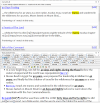
1 - How to print (copy) this window (search results) and keep highlight?
2 - When use (print this window) exported as Microsoft PDF it keeps highlight.
3 - I have in the past been able to do this I think. Forgot I guess.
4 - This is a Ctrl+Mouse click search command.
5 - If I drag and copy all (the window results) then paste in Word (works) but highlight is black (not yellaow as shown).
Simply put...
This is the "search" (results) window I think. I want to search, then be able to copy that search, entire contents or partial, into the SS editor and keep highlights.

