
You are using an out of date browser. It may not display this or other websites correctly.
Highlights and Settings
- Thread starter Johnny NL
- Start date


 ...
...
- Messages
- 6,450
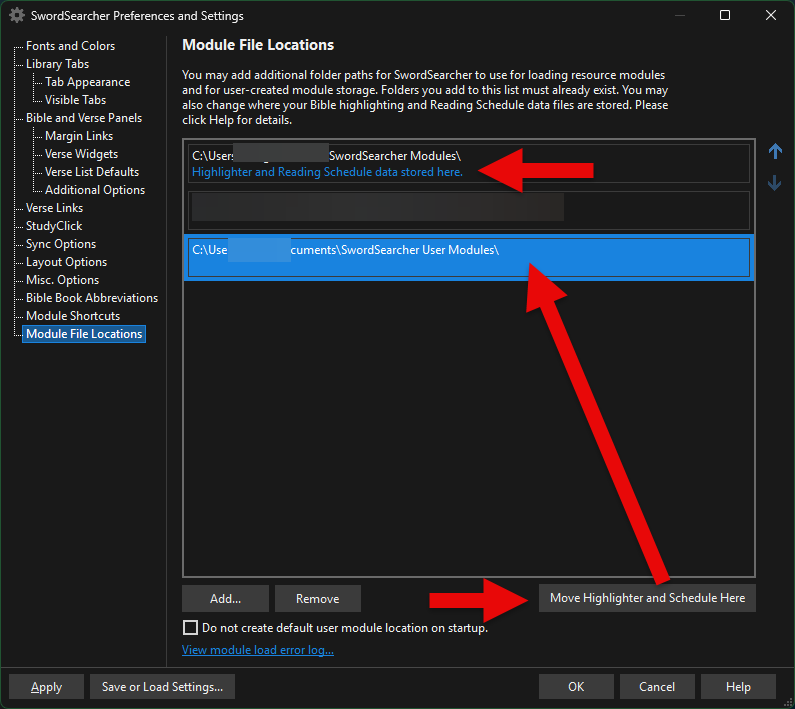
By default, they are in Documents\SwordSearcher User Modules. But you can check if they are expected somewhere else by going to File, Preferences, Module File Locations. You can also control where SwordSearcher looks for those files there.
- Messages
- 6,450
Sorry I missed the "settings" part. The vast majority of the settings are stored in the system registry, not in a file. You can export/import settings from the File menu:Settings are stored SS10?

HarpazotheRedeemed
Active Member
- Messages
- 38
It's okay, the good news is that the screenshots above from Brandon helped us make sure the files are in the RIGHT placeTried everything that I know of, but no success so far.
This is being above my pay grade....
...
 Now, I can start over with the highlighting and reading plan and go forward. At least all of my personal books and commentaries are in tact. At the end of the day, I'm just grateful for this software, and community and the fact that I can use it. I've only been using this since August so I'll continue to get more organized and learn as I go. Thank you Johnny and everyone
- Messages
- 6,450
I have a short guide for migrating to a new PC here:
 forums.swordsearcher.com
This can also be helpful for preparing/restoring backups.
Migrate SwordSearcher to a New PC
I got a new PC. What would be the quickest way to migrate SS, including custom modules/settings, over to it. Thanks!
forums.swordsearcher.com
This can also be helpful for preparing/restoring backups.
HarpazotheRedeemed
Active Member
- Messages
- 38
Thank you so muchI have a short guide for migrating to a new PC here:
Migrate SwordSearcher to a New PC
I got a new PC. What would be the quickest way to migrate SS, including custom modules/settings, over to it. Thanks!
This can also be helpful for preparing/restoring backups.