Build Commentary

Pastor Langley

Beta Tester
Messages
1,112
Somewhere I came across what I needed. And yet today cannot find it. So Forum, I need help.
When I built my first commentary it was simple. When I want something in it I just add an entry. But by doing this simple build, it does not have "every" single chapter, verse, inside the module. I noticed some commentary's may or may not use every verse, and just does not show that chapter or part of a text.

I am looking for that build or text file that has all 66 books and their associated chapters and verses included when you build the module. So it is ready for a complete verse by verse addition of your own actual bible commentary. Hope someone gets this. I am still looking for that file. I have seen it or downloaded it before. Thanks.
 
That was it!!! I knew it was somewhere. Thank you.
Well, excited and thankful, but I must have forgot how.
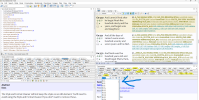
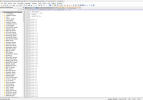
Here is what I thought the output would be!
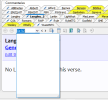
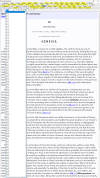
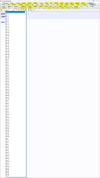
Screenshot (50) edit.png Mine below(image) does not show any verses at all. I thought, as with (some) other commentaries, it would have all 66 books and their verses like the text file you sent me. Ran through Forge, gave it a name, but all blank. The ability is there to edit any and all verses, but as with the image above, it does not have them already there. How do I get that file to do what the image is showing above? My results.
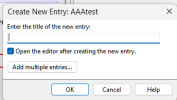
Screenshot 2026-06-09 130924.png I think it is in Forge where I may have went wrong, dunno.
 
Last edited:
I thought that it would show every chapter, and verse, even without text in that entry? Is it only when you add text that it does this?
 
I thought that it would show every chapter, and verse, even without text in that entry? Is it only when you add text that it does this?
Forge doesn't write empty entries to a compiled module. I can't imagine how a commentary module that says it has content on an entry that is actually blank would be helpful. If you describe your use-case maybe I can suggest a different approach.
 
What I thought would happen.
Use-case: example here
A copy of Matthew Henry's Whole Bible Commentary, without any text. Then I would begin to fill in each entry on my own. Thus, building my own commentary. This is what I understood would happen by the using the text file using Forge.
My Understanding:
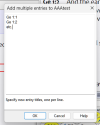
Same as building a book module, each entry has a title, name, etc. When opening Table of Contents Tool, all entries are visible. The commentary I thought would be like that. So my thinking was use Forge, let it build all those entries for me. Same as building a book module when you choose add multiple entries.
Screenshot 2026-06-09 144733.png Screenshot 2026-06-09 144833.png

Contents of txt file.
Screenshot 2026-06-09 143432.png Thought the lines of code were inside text file from wsbones?
Screenshot 2026-06-09 143827.png Example MHWHC Matthew Henry's Whole Bible Commentary
 
I thought the $$ is the thing that does this.
 
Maybe it worked fine, I just do not know what I am doing. Ha!
When text is placed into module, I get what I was thinking.
Ge 1:1 test
Ge 1:2 test
etc.
it does look like Matthew Henry module after I add the test text.
I thought when I built it it would show all entry's all chapters and all verses ready to place text inside.
 
This is the code used from wsbones:
Except used Forge ver. is 4.0.2.3

; User module export from SwordSearcher 10.0.5.26020
; Compile with Forge 3.1 or later. http://www.swordsearcher.com/forge/
; TITLE: Langley Commentary
; ABBREVIATION: Langley_1

$$ Ge 1:1
$$ Ge 1:2
$$ Ge 1:3
$$ Ge 1:4
$$ Ge 1:5
$$ Ge 1:6
$$ Ge 1:7
$$ Ge 1:8
all the way to
$$ Re 22:21
 
I made an edit to what I sent you to put the verse reference also below the $$ entry.
It looks like this now. I will put this module on my 1drv and post a new link in a little while.
Bill.
-----------------------
; Bible or commentary module for SwordSearcher 6.1.0.15
; User Bible
; ENCODING: UTF-8
; TITLE: Empty Commentary
; ABBREVIATION: EComm

$$ Ge 1:1
Ge 1:1
$$ Ge 1:2
Ge 1:2
$$ Ge 1:3
Ge 1:3
$$ Ge 1:4
Ge 1:4
$$ Ge 1:5
Ge 1:5
$$ Ge 1:6
Ge 1:6
$$ Ge 1:7
Ge 1:7
... through Revelation
 
I made an edit to what I sent you to put the verse reference also below the $$ entry.
It looks like this now. I will put this module on my 1drv and post a new link in a little while.
Bill.
-----------------------
; Bible or commentary module for SwordSearcher 6.1.0.15
; User Bible
; ENCODING: UTF-8
; TITLE: Empty Commentary
; ABBREVIATION: EComm

$$ Ge 1:1
Ge 1:1
$$ Ge 1:2
Ge 1:2
$$ Ge 1:3
Ge 1:3
$$ Ge 1:4
Ge 1:4
$$ Ge 1:5
Ge 1:5
$$ Ge 1:6
Ge 1:6
$$ Ge 1:7
Ge 1:7
... through Revelation
THANK you.... I would not have thought of that, until I saw it.
First line:
$$ Ge 1:1
Second Line:
Ge 1:1
Then what you want to be displayed.

Wow thank you for this sir.
 
Forge doesn't write empty entries to a compiled module. I can't imagine how a commentary module that says it has content on an entry that is actually blank would be helpful. If you describe your use-case maybe I can suggest a different approach.
I simply am building a Commentary.
 
Here's the link to updated Empty Commentary:
ecomm.zip
Oh how I thank you sir. That is exactly what I was trying to do.
It seems to be like a "hyperlink" <A send to code followed by the title to be displayed. At least my slow, low tech, thinking here...
 
Last edited:
Back
Top