Help

Pastor Langley

Beta Tester
Messages
1,237
HELP...
These are all over the place on my system. See images.
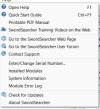
  1. Module Error Log
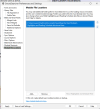
  2. Module File Locations
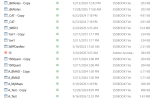
  3. Multiple Copy Files
Don't ask how, If I knew that wouldn't be here. :p This happened when changing my OneDrive settings and not paying attention. Anyone have ideas?
ModuleErrorLog.png Error ModuleFileLocations.png Locations MultipleCopyFile.png Copy (problem)
Odd thing is that it is also inside (some not all) the Assets folders as (copy)'s...
 
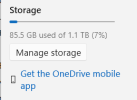
OneDrive is synced so this is an existing issue. My guess is to copy a "backup" then all will be fine. 85.5 GB may take a few minutes.
Screenshot 2026-10-01 094414.png Will await any comments before starting. Error message is not the problem, the copy files are, the system is working.
But "I HATE ERRROR MESSAGES" :mad: :eek:🥵🥸🔍 Especially when It was my fault....
 
I just finished the last details and all is good. Waiting on OneDrive to finalize. Pray that all is well. My fix was simple.
Wanted to know what others might say. I deleted all SS user folder copied back my backup all is good. Did not want to work or find the problem, that was me!
 
I just finished the last details and all is good. Waiting on OneDrive to finalize. Pray that all is well. My fix was simple.
Wanted to know what others might say. I deleted all SS user folder copied back my backup all is good. Did not want to work or find the problem, that was me!

Hope all is fine now 🙏
 
I am not sure what I'm seeing, but let us know if you still have a problem after your OneDrive finishes syncing, and we'll get it figured out.
 
Thanks everyone. Update:
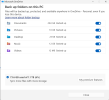
This was a fluke on my part by making a change in OneDrive settings. I think what I did was change the settings here:
Screenshot 2026-10-01 153945.png In that process perhaps I did not wait on OneDrive "sync" to catch up.
This is why I "backup". I simply deleted all the user folder files and copied the "latest backup" back into that same folder. Thanks for those who asked or commented. All is well all is working. These backups are daily by me and by the minute with OneDrive. What would have happenedif my backups were a wekk a month, or longer old? I would have lost a lot of work.
I depend on OneDrive and use Freefile Sync both consistently.
 
Thanks everyone. Update:
This was a fluke on my part by making a change in OneDrive settings. I think what I did was change the settings here:
View attachment 3192 In that process perhaps I did not wait on OneDrive "sync" to catch up.
This is why I "backup". I simply deleted all the user folder files and copied the "latest backup" back into that same folder. Thanks for those who asked or commented. All is well all is working. These backups are daily by me and by the minute with OneDrive. What would have happenedif my backups were a wekk a month, or longer old? I would have lost a lot of work.
I depend on OneDrive and use Freefile Sync both consistently.
I still backup very often, on a external SSD, which is "IN" a Fire Proof safe...
I love that I "can" touch my notes...
.;) (+ 2x Flash Drives....)
I have gone through "tears of blood" before.....😁😆

Guess who got me out of my misery ? ? ? ?...
 
Proverbs 27:12 (KJV) ¶ A prudent [man] foreseeth the evil, [and] hideth himself; [but] the simple pass on, [and] are punished.
In that spirit, a reminder: backups are fundamental. We’ve learned this the hard way."
 
I do use OneDrive because of my different devices that I sync across 😏... however, this post has reminded me that I have not backed up on my external HD in a while... going to do so now 😁
 
Thanks for comments. My hope is now seek where others, if use OneDrive, what you practice? For me not so much to do with windows, it has everything to do with SwordSearcher, my FIlES, and my work in using SwordSearcher. Honestly when I am on a computer nowadays, 15% of my time is R&D the rest SwordeSearcher as bible reading, study, sermons, editing works, ya I like it. But I do force myself to real books, pencil and paper, on purpose to keep those skills. I have learned from my mistake, and hope to learn from others.

Update. Probelm was self-inflicted. I chose for "whatever" reason to make a change. :eek:I have one desktop and one laptop. My practice, SwordSearcher desktop 85% of all work. If I make a change within SwordSearcher OneDrive just syncs with no problems. If you are a OneDRive user, you should not practice running both (systems) while using OneDrive. (Of course, wait for sync if two systems) Never had an issue until I "made a change".
My process.
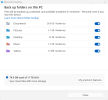
Screenshot 2026-10-04 055915.png Settings today (before the change).
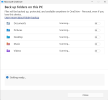
Screenshot 2026-10-04 055856.png Settings when issue came up. I literally do not know "why I made a change"

Best Answer: I did not wait (slow connections) for the sync and tried to fix something that was not broken.🦉not so wise
Screenshot 2026-10-04 055915.png Settings NOW: Of course "the fix" can be very simple, (if you have a backup!)

My Folder Locations Now: owass (first 5 letters of your email address, Owasso, OK, not curse word language)
Desktop: ​
C:\Users\owass\OneDrive\Documents\SwordSearcher User Modules (Onedrive)​
C:\Users\owass\Documents (deep search in C:\ drive)​
Laptop: ​
C:\Users\David\OneDrive\Documents\SwordSearcher User Modules (Onedrive)​
C:\Users\David\Documents (deep search in C:\ drive)​
Below is what is in the c:\ drive location of laptop.​
I have two locations on the laptop where only one location on DeskTop.​
Screenshot 2026-10-04 070547.png​
 
Thanks for comments. My hope is now seek where others, if use OneDrive, what you practice? For me not so much to do with windows, it has everything to do with SwordSearcher, my FIlES, and my work in using SwordSearcher. Honestly when I am on a computer nowadays, 15% of my time is R&D the rest SwordeSearcher as bible reading, study, sermons, editing works, ya I like it. But I do force myself to real books, pencil and paper, on purpose to keep those skills. I have learned from my mistake, and hope to learn from others.

Update. Probelm was self-inflicted. I chose for "whatever" reason to make a change. :eek:I have one desktop and one laptop. My practice, SwordSearcher desktop 85% of all work. If I make a change within SwordSearcher OneDrive just syncs with no problems. If you are a OneDRive user, you should not practice running both (systems) while using OneDrive. (Of course, wait for sync if two systems) Never had an issue until I "made a change".
My process.
View attachment 3193 Settings today (before the change).
View attachment 3194 Settings when issue came up. I literally do not know "why I made a change"

Best Answer: I did not wait (slow connections) for the sync and tried to fix something that was not broken.🦉not so wise
View attachment 3193 Settings NOW: Of course "the fix" can be very simple, (if you have a backup!)

My Folder Locations Now: owass (first 5 letters of your email address, Owasso, OK, not curse word language)
Desktop: ​
C:\Users\owass\OneDrive\Documents\SwordSearcher User Modules (Onedrive)​
C:\Users\owass\Documents (deep search in C:\ drive)​
Laptop: ​
C:\Users\David\OneDrive\Documents\SwordSearcher User Modules (Onedrive)​
C:\Users\David\Documents (deep search in C:\ drive)​
Below is what is in the c:\ drive location of laptop.​
I have two locations on the laptop where only one location on DeskTop.​
​
I love how you "cherish" The SS10..... 📚 ;)❤️💙❤️
 
Back
Top